How to Migrate Your Medical Logbook from LogBox to Heykudu
If you have ever spent 20 minutes coaxing a legacy portal to save an intubation log while your consultant heads to tea, this guide is for you. Here is how to export your entire procedural history from LogBox and import it into Heykudu with zero data loss.
Open LogBox & Sign In
Navigate straight to https://logbook.logbox.co.za/#/logbook/default and sign in with your email and password.
Click “LogBook” in the Navigation
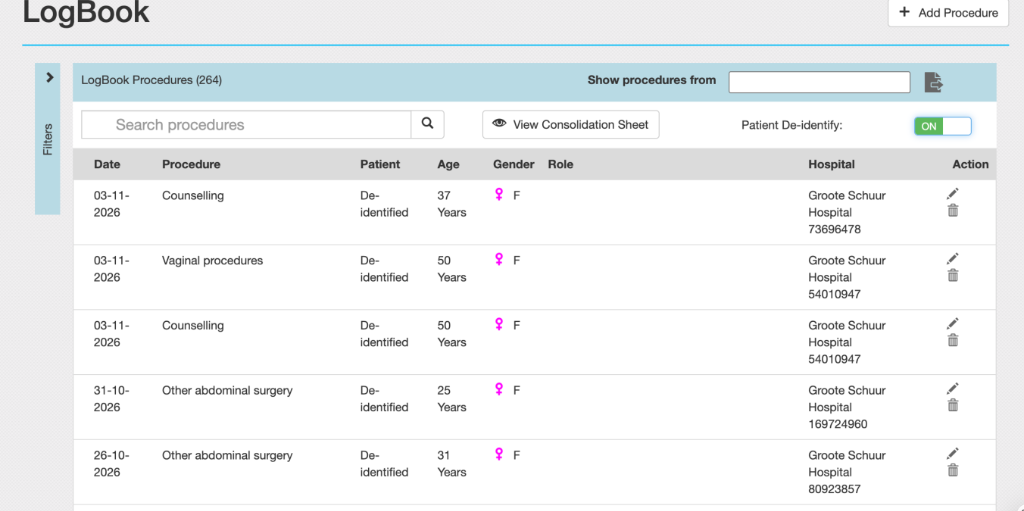
Select the LogBook tab on the left rail. You will see your full procedural database: dates, patient references, procedure categories, supervisor names, and sign-off statuses (shown in Figure 1 below).
Click the Download Icon
In the upper-right corner of the procedure table (next to the date and search filters), click the Download icon (represented as a tray with an arrow, indicated in Figure 1). This will open the export format modal.
Select “XLS” (Excel) & Download
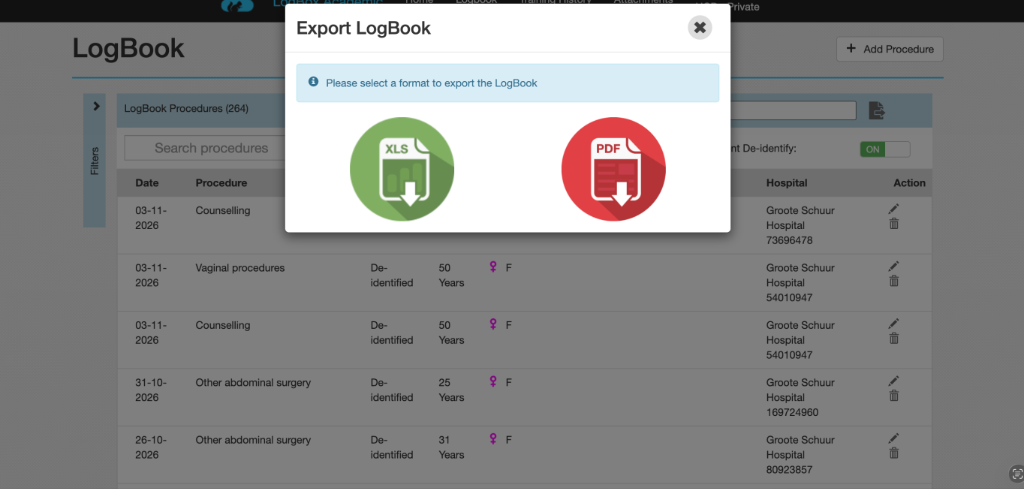
In the format dialog (shown in Figure 2), select XLS and confirm. Your browser will download your raw .xls file immediately.
Import Spreadsheet into Heykudu
Now open the automated Heykudu Migration Wizard. You can access it directly via https://www.heykudu.com/?view=migrate (or https://www.heykudu.com/migrate).
Start Your Instant Import
Enter your full name and medical trainee email (e.g., dr.name@uct.ac.za).
Choose your specialty block (e.g. FCOG / O&G, Surgery, Internal Medicine, Pediatrics).
Upload your LogBox .xls file and click Migrate Logbook. Done!
What You Get on Heykudu
30-Second Case Logging
Log your procedure, category, and role in 3 taps between patients. No tedious multi-step drop-down mazes.
Instant Consultant QR Sign-Offs
Show your screen to your consultant. They scan it with their camera and sign off your Mini-CEX or DOPS in 8 seconds flat — no app or login needed for them.
Live CMSA & College Progress
Visual progress meters show you exactly where you stand against required rotation quotas so there are zero surprises before exam sign-offs.
Works Offline in Theatre Basements
Zero signal in the depths of Chris Hani Baragwanath or Groote Schuur? Heykudu caches everything locally and syncs automatically when back online.
Frequently Asked Questions
What happens to my old signatures and approvals?
Your LogBox XLS export contains the supervisor names and sign-off statuses for each case. Heykudu’s ingestion pipeline reads and preserves these historical records.
Is Heykudu free for medical trainees?
Yes, 100% free for individual medical students, interns, and registrars.
Start Your LogBox Migration
Upload your LogBox export to Heykudu in under 60 seconds.